به دلیل قطعی اینترنت و نبود دسترسی به ایمیل‌های خارجی، می‌توانید بدون نیاز به تایید ایمیل، ثبت‌نام کنید و پرسش‌های خود را بپرسید.

اولین بار است که به اینجا می‌آیید؟ راهنمای سایت را بخوانید!
0 رای
1.5k بازدید

سلام
من می خواهم جدول مقاله را افقی کنم.
وقتی جدول را در فایل جداگانه می گذارم و کد مربوط به چرخش جدول را می گذارم اعمال می شود.
ولی در فایل مقاله ام اجرا نمی شود.

یعنی ممکن است تداخل پکیج وجود داشته باشد؟
آیا راهی برای فرار از این مشکل هست؟
چون حتی نمی دانم با کدام پکیج ممکن است تداخل ایجاد کرده باشد!

آیا احتمالات دیگری برای علت این مسئله به ذهنتان می رسد؟

من احتمال می دهم به کلاس

‎\documentclass{svjour3}

که مربوط به قالب ژورنال است مربوط باشد.

ولی با

\documentclass{article}‎

کار میکند!

آدرس قالب:
https://www.sharelatex.com/templates/journals/svjour3-(springer-journals)

فایل(های) پیوست:
جواب سوال شما در حالت کلی بله است. اضافه کنم که در کل این طور نمیشه در مورد سند شما اظهار نظر کرد; چون خیلی کلی است.
قبل از پرسیدن سوال بهتر است راهنما http://qa.parsilatex.com/faq و قوانین سایت http://qa.parsilatex.com/rules را برای چگونگی پرسیدن سوال مطالعه کنید.
شما باید فایل کمینه با فرمت «تک» ضمیمه کنید که شامل موارد محیط شما باشد و اجرایی باشد (که این‌کار را انجام نداده‌اید. توضیح تنها کافی نیست).
توسط (8.7k امتیاز)
کد را اضافه کردم و سوال را ویرایش کردم.
همانطور که نوشتم بنظرم به کلاس ژورنال ربط دارد.
توسط (48 امتیاز)

1 پاسخ

0 رای

سلام


شما باید فایل ژورنال را از این آدرس دریافت کنید.

بعد از دانلود آن، از حالت زیپ خارج کنید و بدون تغییر آن به کمک توضیحات این صفحه، فایل را پردازش کنید.
کد زیر را دارید:


\begin{filecontents*}{example.eps}
gsave
newpath
  20 20 moveto
  20 220 lineto
  220 220 lineto
  220 20 lineto
closepath
2 setlinewidth
gsave
  .4 setgray fill
grestore
stroke
grestore
\end{filecontents*}
\RequirePackage{fix-cm}
\documentclass[smallextended]{svjour3}      
\smartqed
\usepackage{graphicx}
\begin{document}

\title{Insert your title here
}
\subtitle{Do you have a subtitle?\\ If so, write it here}

%\titlerunning{Short form of title}        % if too long for running head

\author{First Author         \and
        Second Author %etc.
}

%\authorrunning{Short form of author list} % if too long for running head

\institute{F. Author \at
              first address \\
              Tel.: +123-45-678910\\
              Fax: +123-45-678910\\
              \email{fauthor@example.com}           %  \\
%             \emph{Present address:} of F. Author  %  if needed
           \and
           S. Author \at
              second address
}

\date{Received: date / Accepted: date}
% The correct dates will be entered by the editor


\maketitle

\begin{abstract}
Insert your abstract here. Include keywords, PACS and mathematical
subject classification numbers as needed.
\keywords{First keyword \and Second keyword \and More}
% \PACS{PACS code1 \and PACS code2 \and more}
% \subclass{MSC code1 \and MSC code2 \and more}
\end{abstract}

\section{Introduction}
\label{intro}
Your text comes here. Separate text sections with
\section{Section title}
\label{sec:1}
Text with citations \cite{RefB} and \cite{RefJ}.
\subsection{Subsection title}
\label{sec:2}
as required. Don't forget to give each section
and subsection a unique label (see Sect.~\ref{sec:1}).
\paragraph{Paragraph headings} Use paragraph headings as needed.
\begin{equation}
a^2+b^2=c^2
\end{equation}

% For one-column wide figures use
\begin{figure}
% Use the relevant command to insert your figure file.
% For example, with the graphicx package use
  \includegraphics{example.eps}
% figure caption is below the figure
\caption{Please write your figure caption here}
\label{fig:1}       % Give a unique label
\end{figure}
%
% For two-column wide figures use
\begin{figure*}
% Use the relevant command to insert your figure file.
% For example, with the graphicx package use
  \includegraphics[width=0.75\textwidth]{example.eps}
% figure caption is below the figure
\caption{Please write your figure caption here}
\label{fig:2}       % Give a unique label
\end{figure*}
%
% For tables use
\begin{table}
% table caption is above the table
\caption{Please write your table caption here}
\label{tab:1}       % Give a unique label
% For LaTeX tables use
\begin{tabular}{lll}
\hline\noalign{\smallskip}
first & second & third  \\
\noalign{\smallskip}\hline\noalign{\smallskip}
number & number & number \\
\noalign{\smallskip}\hline
\end{tabular}
\end{table}


%\begin{acknowledgements}
%If you'd like to thank anyone, place your comments here
%and remove the percent signs.
%\end{acknowledgements}

% BibTeX users please use one of
%\bibliographystyle{spbasic}      % basic style, author-year citations
%\bibliographystyle{spmpsci}      % mathematics and physical sciences
%\bibliographystyle{spphys}       % APS-like style for physics
%\bibliography{}   % name your BibTeX data base

% Non-BibTeX users please use
\begin{thebibliography}{}
%
% and use \bibitem to create references. Consult the Instructions
% for authors for reference list style.
%
\bibitem{RefJ}
% Format for Journal Reference
Author, Article title, Journal, Volume, page numbers (year)
% Format for books
\bibitem{RefB}
Author, Book title, page numbers. Publisher, place (year)
% etc
\end{thebibliography}
\end{document}

با این خروجی:
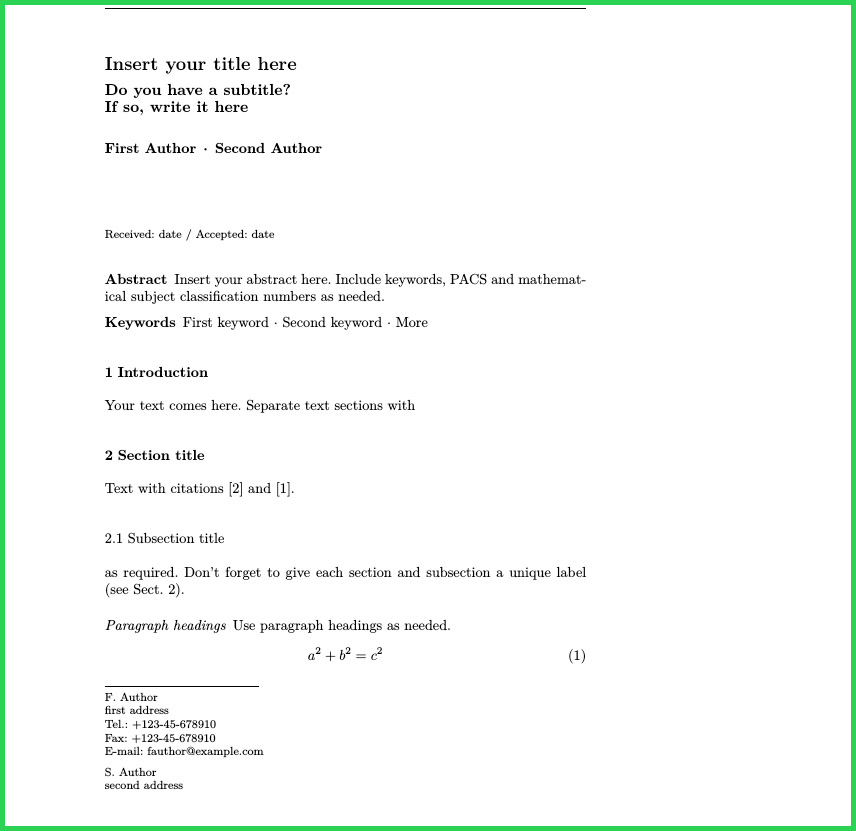

enter image description here


![enter image description here][4]

اگر نیاز دارید در این قالب فارسی نیز بنویسید از پاسخ من در این صفحه کمک بگیرید.

موفق باشید.

سلام
من کد قالبی که گذاشتید را قرار دادم و جدولم را گذاشتم
ولی خطا می دهد و اصلا فایل پی دی اف را لود نمی کند
توسط (48 امتیاز)
وقتی کدی اجرا شده و خروجی صحیح قرار داده شده است پس کد هیچ موردی نداره. شما مشکل رو باید در دستگاه  و فایل خودتون پی گیری کنید. تو صیه می کنم دوباره به دقت مراحل رو بخونید و انجام بدید. موفق باشید.
توسط (8.7k امتیاز)
پرسیدن سوال
سایت پرسش و پاسخ پارسی‌لاتک جایی برای پرسش و پاسخ درباره سیستم حروف‌چینی لاتک و بسته زی‌پرشین است. در اینجا می‌توانید سوال‌های خود را بپرسید و به سوال‌های دیگران پاسخ دهید.

7.2k پرسش

6.6k پاسخ

23.7k نظر

11.7k کاربر

basket cart icon

محصولات مرتبط با LaTeX

در فروشگاه پارسی‌لاتک


basket cart icon

حمایت مالی از پارسی‌لاتک

برای تامین هزینه‌های نگه‌داری و به‌روزرسانی

محبوب‌ترین برچسب‌ها

رفع خطا جدول xepersian مراجع ریاضی‌نویسی bidi شکل فونت فهرست مطالب شماره‌گذاری منابع پانویس tikz parsilatex بیب‌تک تک‌لایو بیمر اسلاید زی‌پرشین پاورقی سربرگ bibtex نماد رسم شکل فرمول‌نویسی هدر ارجاع‌دهی biditexmaker ویرایشگر قالب beamer واژه‌نامه texstudio اندازه فونت عنوان فصل ماتریس شماره صفحه اعمال نشدن تغییرات در پی‌دی‌اف رسم جدول bidipresentation حاشیه رنگ عنوان شکل اسلاید فارسی محیط قضیه گراف حروف‌چینی کد مکان شکل شماره فصل enumerate tabriz_thesis tikzpicture نمایه align زیرنویس شکل کادر itemize الگوریتم فهرست اشکال listings عدم اجرا نیم‌فاصله فاصله بین خطوط متن لاتین و فارسی hyperref بسته قالب پایان‌نامه فرمول نصب تک‌لایو فارسی‌تک نمودار شماره فرمول glossaries کپشن حروف‌چینی چندستونی خروجی فونت فارسی و انگلیسی ماکرونویسی extrafootnotefeatures لاتک biditools شماره پاورقی پیوست‌ سوال امتحانی فاصله‌گذاری فرمول چندضابطه‌ای tex subfigure biditufte-book header texmaker pdf خطا longtable تصویر شمارنده زیرنویس texlive2015 دیاگرام میک‌تک رسم نمودار شماره‌گذاری صفحات پایان نامه فهرست جداول تورفتگی texlive2016 شعر بولد آکولاد kashida میکروسافت ورد تنظیم جدول سوال چهارگزینه‌ای قاب texworks caption اندیس فاصله عمودی lollipop چپ‌چینی iust-thesis multicol فصل‌نویسی tcolorbox اعداد فارسی pgfplots xindy اوبونتو geometry xelatex texlive کاما fancyhdr وسط‌چینی تک لایو 2015 شماره گذاری به‌روزرسانی بسته aimc46 شکست خط صفر توخالی فرمول طولانی قالب کتاب فونت اعداد بیرون‌زدگی bidipoem عنوان بخش پوستر فاصله سطرها نوشتافت tex-programming قرآن tabriz-thesis ایتالیک winedt جستجوی معکوس فلش جایابی تصویر فهرست تصاویر پاراگراف‌بندی بازیابی اطلاعات هایپرلینک فهرست نمادها شمارنده فصل حروف‌چینی شعر font محیط ریاضی minipage رسم کادر جداکننده جدول طولانی به‌روزرسانی شماره‌گذاری فرمول algorithm2e proof equation eps جدول افقی tabular عکس متن فارسی و انگلیسی پانویس چندستونی کمک مالی فاصله خطوط فونت بولد زیرشکل پانویس پاراگرافی ltrfootnote پیوست computeautoilg فرمول چندخطی persian-bib neveshtuft غلط‌گیری املایی فونت ریاضی پیکان لاتکس قلم baselineskip شماره قسمت عنوان جدول
...